Local Gemma AI App: How Outside Hour Works
See how Outside Hour uses a local Gemma model and open map data to plan a walk, protect location privacy, and get you off your phone. Explore its design.

Outside Hour Shows What a Local AI App Can Do by Stepping Aside
Most apps compete for your attention. Outside Hour takes a different approach: it limits you to a 60-second session, produces a practical plan, and then pushes you to put the phone away. The app runs a Gemma model locally on a laptop. It takes open map and weather data and turns that into a short walking card. Regular code handles the parts that could make the plan unsafe if they were wrong.
That split - between deterministic data and model-written text - is the interesting bit. Outside Hour isn't arguing that every app should use AI, or that a small local model can replace maps and routing. It's a clear example of how to narrow what a model is responsible for, constrain what it can choose, and show where it may fall short. The output is a pocket card with a destination, direction, turn-back time, a few things to notice, and weather-aware packing notes - plus an option to print and a calendar alarm. Here's how it works, what's solid, and where the compromises show up.
What Outside Hour does
Outside Hour is a small open-source project made for the DEV and Hacktoberfest Open-Source AI Challenge, Week 1: "Touch Grass." The goal is simple: help someone plan one short trip outside without turning planning into another long phone session.
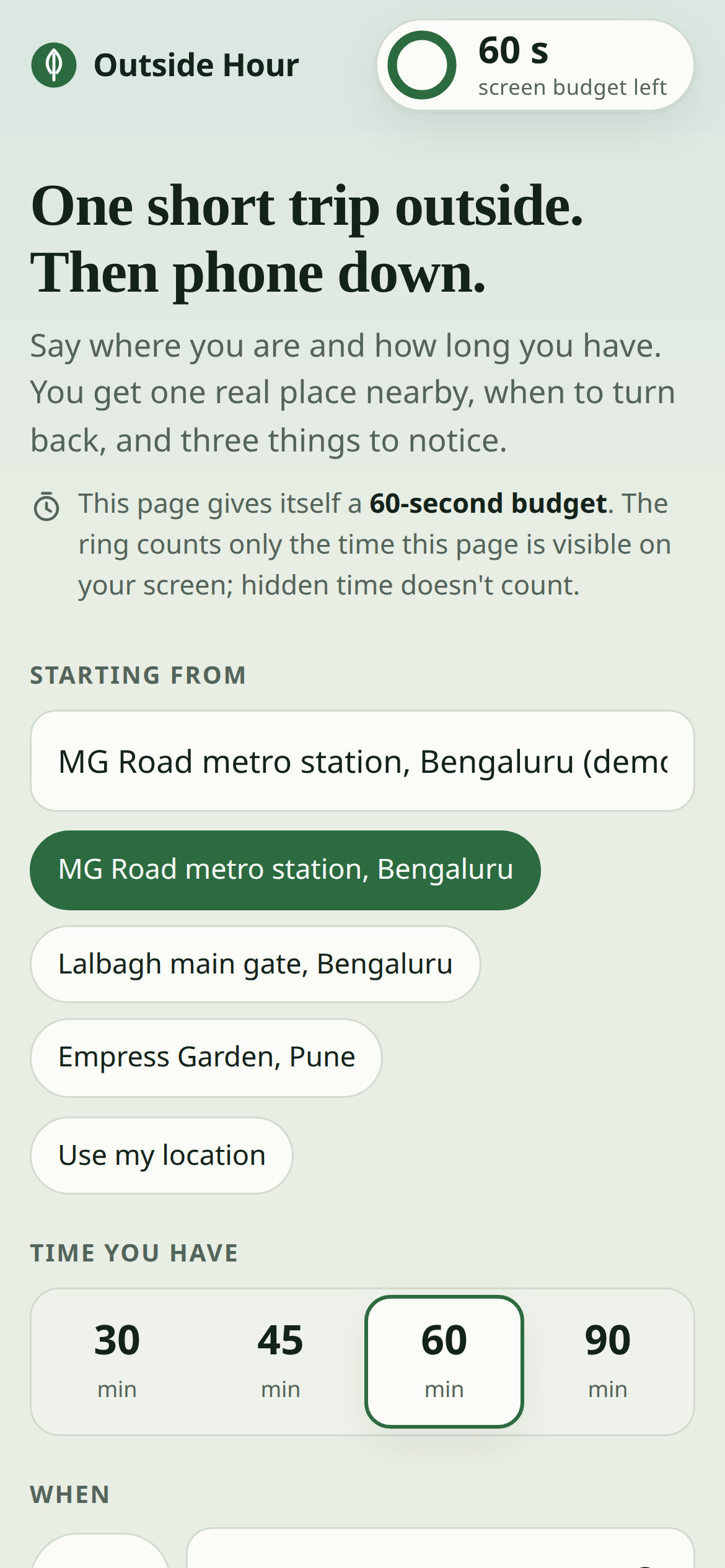
You enter a starting point, how much time you have, and when you want to go. The app looks for mapped parks, gardens, lakes, viewpoints, and nearby related places. It checks the forecast, sunset, and air quality, then asks a local Gemma model to pick from a small set of real candidates and write a concise card.
The interface reinforces the point. A ring counts down from 60 seconds while the page is open. When time runs out, it turns red, dims the page, and tells you to put the phone down. A black screen follows, keeping just the essentials - place, direction, and turn-back time - front and center. You can also print an A6 pocket card or export a calendar event with a reminder for when to head back.
A plan, not a navigation app
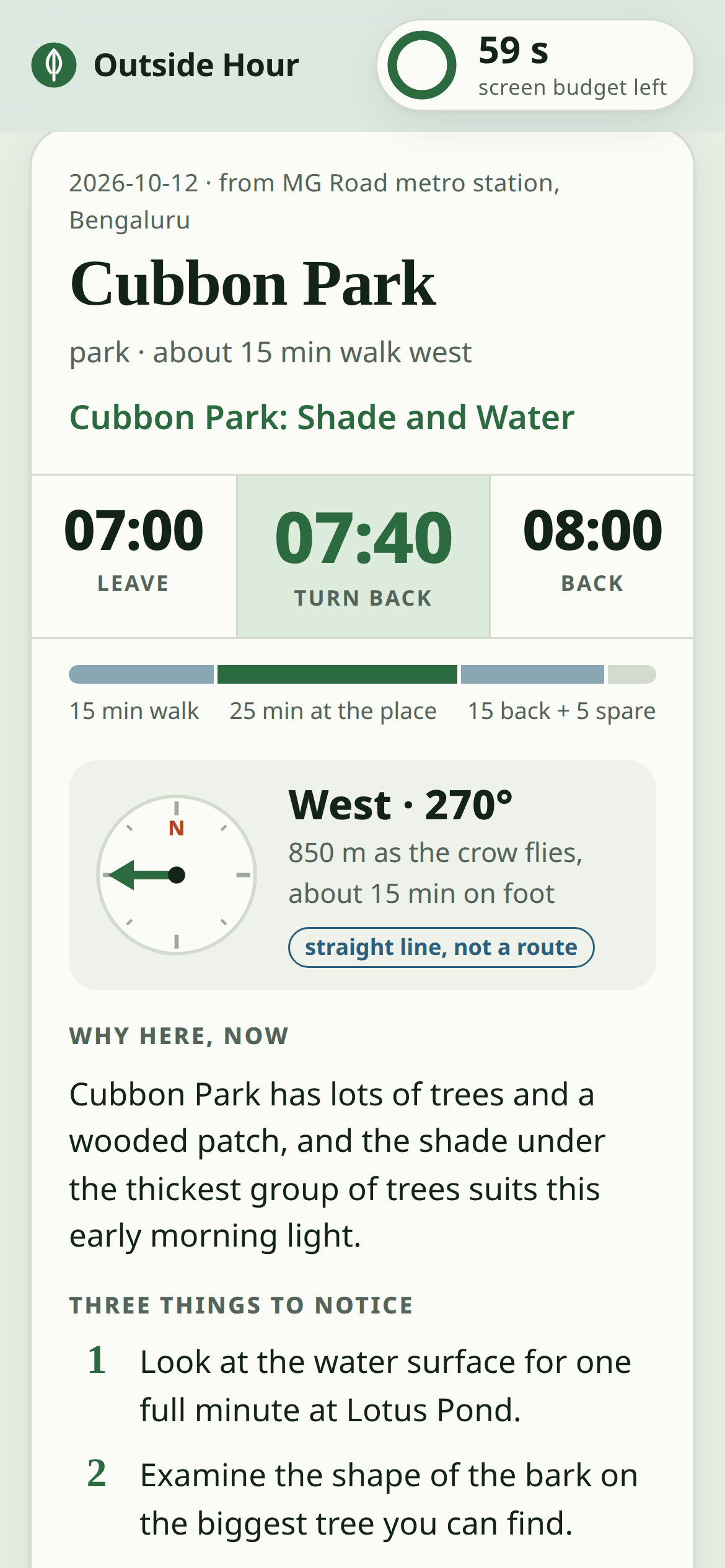
The difference matters. Outside Hour doesn't give turn-by-turn directions or a fully routed walking distance. Instead, it calculates a compass bearing and a straight-line distance to the nearest edge of a place, and labels it that way. Walking duration is estimated from distance using a basic speed assumption, then adjusted for paths that aren't perfectly straight.
That's enough to orient a short outing, but it isn't enough to replace a real route planner. The project makes the limitation visible instead of presenting the estimate like turn-by-turn navigation. If you need accessible routes, current path closures, or directions through a large park, you'll still want a dedicated maps service.
A sample plan starts at MG Road metro station in Bengaluru and suggests a morning visit to Cubbon Park. The card can reference mapped features such as Lotus Pond, Bamboo Island Pond, trees, or benches, then nudge you toward observations that fit the time of day. For a 7 a.m. walk, that might mean looking at the water or noticing dew and long shadows. These are prompts, not claims that the model has been there.
Getting off the screen is part of the product
The 60-second timer isn't just decoration. It shapes the workflow: pull together the inputs, generate a plan, and make it usable without keeping the app open outdoors.
The app also measures time on the page and time away using the browser's Page Visibility API. That's a limited signal - the browser can tell whether its tab is visible, not what you're doing in other apps. Outside Hour acknowledges that in the interface. In other words, it doesn't imply it can monitor more than the browser can actually report.
How the system divides work
The clearest design choice in this project is the boundary between deterministic data and generated language. Outside Hour uses code and open data for anything that could materially affect the plan. The Gemma model is used to select among valid candidates and write the final card.
That boundary is more useful than a vague "be accurate" instruction. A language model can write confidently even when its facts are wrong. It might invent a park, mis-estimate sunset, or produce a questionable return time. Prompts alone aren't a dependable safety control. In this project, the model isn't asked to do those jobs.
1. Fetch local facts from open data
The application uses OpenStreetMap data to find nearby named parks, gardens, water bodies, viewpoints, and paths. If you want more detail, an optional query collects features mapped inside or around candidate areas - ponds, individual trees, benches, drinking-water taps, toilets, and playgrounds. Weather, sunrise and sunset, and air-quality information come from Open-Meteo.
These sources let the demo work without commercial map or weather API keys. Requests are cached, and the project uses a descriptive User-Agent and retries. Open Overpass servers are shared infrastructure, not private production services with guaranteed response times. The builder reports running into 504 errors during development and uses caching to reduce repeated requests.
The app also uses rounded coordinates - roughly 100 meters for OpenStreetMap and 1 kilometer for Open-Meteo - so cached data can support offline planning for areas already fetched. That reduces exposure and dependency, but it doesn't eliminate network calls in every situation. If you're asking about a new area, the data providers still receive an approximate location.
2. Compute the plan in code
Code ranks candidate places and calculates walking-time estimates, the available time window at the destination, the turn-back time, sunset cut-offs, and a bearing. It also produces structured light descriptions like "early morning" or "before sunset." Those are passed to the model as facts, not generated from general knowledge.
Filtering matters too. The system skips categories like cemeteries, drains, private land, and unnamed spots. It can use mapped features to distinguish between parks and provide grounded details for the card. The project also avoids quoting counts of mapped trees or benches in generated text - those counts reflect what volunteers have mapped and shouldn't be treated as a complete inventory.
Still, there are approximations. The walking estimate assumes a speed of 4.5 kilometers per hour and multiplies straight-line distance by 1.3 to account for non-straight paths. Large parks are measured to their bounding-box edge, and the bearing is a straight line. Overall, it's best read as a planning aid, not a promise about actual travel time.
3. Let Gemma choose and write within constraints
The model gets a shortlist of five candidates, their mapped features, the calculated times, and suggested observation prompts based on place and lighting. It returns a place identifier, a headline, a reason, three observation prompts, and a line for the phone-down screen.
The place identifier is constrained by a JSON schema to be one of the fetched candidate IDs. That prevents the model from picking a destination the app never looked up. After generation, a validator checks the draft against the source facts. It rejects unsupported place names, contradictory locations, invented numbers or times, references to water or views the map doesn't support, stock filler, and text that looks cut off. The app retries once, then falls back to a plain template.
Validation isn't magic - it can't catch every nuance of a recommendation. What it does provide is a set of targeted checks around common failure modes. The result is less "fully verified output," more "reduced risk for specific things that tend to go wrong."
Running Gemma locally
Outside Hour uses Gemma 4 E2B-it in a quantized GGUF format, served via llama.cpp. The model runs on the builder's 2019 laptop CPU with no GPU. The project is about 1,500 lines of standard-library Python plus a single-page HTML/JavaScript interface. There's no front-end build step and no CDN dependency. The model and llama.cpp are downloaded into the project folder by scripts, without needing administrator privileges or API keys.
The model doesn't handle every feature just because it's the AI component. Map lookup, calculations, filtering, weather retrieval, timers, and calendar export are all regular application code. That keeps the model's role narrow and makes failures easier to debug.
Two practical lessons from model integration
The project calls out two issues encountered while connecting Gemma to llama.cpp. First, using the chat endpoint sometimes led the model to spend time "thinking" before producing JSON, and the grammar wasn't constraining the early tokens as intended. The builder rendered the chat template through llama-server's /apply-template endpoint and then sent the result to /completion, so the grammar applied from the first output token. In the project's benchmark, that produced valid JSON reliably.
Second, strict output-length limits didn't consistently make the writing shorter. Instead, the model could get cut off mid-sentence - or even mid-word. The fix was to loosen the output constraints, request short sentences, and add checks for truncation and unexpected non-English characters. Code also now inserts the turn-back time instead of asking the model to generate it. That removes one obvious source of avoidable error.
The larger takeaway is practical: structured generation takes more than a schema. You have to understand where constraints actually apply in the inference flow, inspect real outputs, and validate the fields that matter to the app. A model can follow a format most of the time and still fail exactly at the boundary the product depends on.
Specificity came from better input, not a bigger model
Early cards were technically plausible but generic: "Enjoy the park's shade and greenery." The model had only a place name and a category. The builder improved the output by giving it more grounded details - named ponds, mapped features, and observation ideas tied to the place and time of day.
That points to a useful product principle. If the model is bland, a bigger model or a longer prompt isn't automatically the right answer. Start by checking whether it has relevant, reliable context. Here, specific local facts gave a small model more usable material, and the validator limited what it could claim.
What the benchmarks and limitations tell us
The reported benchmark ran ten plans across two cities, three starting points, and time windows from 30 to 90 minutes. It used cached map data. The test ran on an Intel Core i5-1035G1 laptop with four cores, eight threads, 10 GB of RAM, WSL2, and no GPU.
| Measure | Reported result |
|---|---|
| Plans written by Gemma rather than the fallback | 10 of 10 |
| Drafts rejected by the checker | 0 |
| Median time per plan | 28.7 seconds |
| Plan-time range | 24.0-32.3 seconds |
| Median output length | 134 tokens |
| llama-server memory after a plan | About 4.3 GB |
| Cards mentioning a mapped feature by simple word matching | 7 of 10 |
The richer prompt added about four seconds per plan compared with an earlier version. Generation speed and total latency will vary with hardware and what else the machine is doing, so this is a credible laptop demo - not a universal performance promise. A phone, an older laptop, or a different model build could behave differently.
Privacy has a narrower meaning than "offline"
Running the language model locally means your location prompt isn't sent to a remote AI provider. That's a real privacy win, especially for an app that asks where you are and when you'll go outside. But local inference doesn't make the whole app network-free. OpenStreetMap and Open-Meteo are still contacted when fresh map or weather data is needed. The project reduces that via coordinate rounding and caching, and it supports offline planning from previously fetched data.
So a more accurate privacy description is: the model input stays local. Approximate location data may still be sent to open-data services. Those are different data flows, and they should be described separately.
Open data brings coverage and quality trade-offs
OpenStreetMap may include locally meaningful details that commercial directories miss, partly because it's maintained by contributors who map places they know. Coverage still varies by area, and map data isn't a complete inventory. Unnamed places are skipped, opening hours aren't enforced, and bounding boxes can include features that sit just outside a park.
Weather data and mapped features can also be incomplete or stale. A generator can't recover what its sources don't include. If a pond isn't on the map, the model shouldn't be expected to know it's there. The app's checks help prevent unsupported claims, but they can't make the underlying data comprehensive.
The attention meter has a boundary
The 60-second budget measures time the page is visible, not total phone usage. The "away" timer measures time the page has been hidden since you selected Phone down. A browser can't inspect other apps, and the project makes that limitation clear. This is a lightweight feedback mechanism, not a full "digital wellbeing" monitoring system.
For a small project, the trade-off is reasonable: it uses a visible, limited signal rather than asking for broad device permissions that would be harder to justify. The goal is to encourage one simple action, not to track the user.
Conclusion
Outside Hour is compelling less because it puts a language model into a walking app, and more because it gives the model a narrow, auditable job. Code computes times and directions. Open data provides the candidates and conditions. Gemma picks among those candidates and turns grounded inputs into a short card. A validator checks predictable failure modes, and the interface makes the measurement limits explicit.
The trade-offs are straightforward too: about half a minute to generate a plan on the tested laptop, variable open-data coverage, estimated rather than routed walking times, and local inference that still depends on network lookups for fresh data. None of those limitations is hidden behind the word "AI."
If you want to inspect the implementation, tests, and demo, start with the Outside Hour GitHub repository. It's a useful reference for anyone building a local AI feature: decide what must be deterministic, give the model only work it can safely do, and make fallbacks and limits part of the product - not an afterthought.